
The partner-routed path delivers a Google Cloud Partner Interconnect VLAN attachment through a partner exchange, used where the target metro is better served that way. The Google-side steps are the same as the direct path; the difference is on the Tata Communications side.
The partner-routed path supports bandwidth slabs from 50 Mbps to 10 Gbps (20/50 Gbps only on a 100 Gbps port or advanced package), with jumbo MTU (< 9000). Encapsulation is QinQ (S-tag + C-tag). Both Layer 3 and Layer 2 service types are supported, and downgrades are supported with minimal impact.
When to choose the partner-routed path
Choose partner-routed where the target Google Cloud region is reachable through a partner exchange rather than a Tata Communications direct interconnect. For the full bandwidth range up to 50 Gbps and the simplest operational model where a direct interconnect is available, use the direct path.
Tata Communications-side delivery parameters
|
Parameter |
Value |
|
Bandwidth slabs |
50, 100, 200, 300, 400, 500 Mbps; 1, 2, 5, 10 Gbps |
|
20 / 50 Gbps |
Only on a 100 Gbps port or advanced cloud-router package; new provisioning only in select metros |
|
Encapsulation |
QinQ (TPID 0x8100) |
|
S-tag (outer) |
Reserved range 1300–1399, unique per customer circuit |
|
C-tag (inner) |
Range 2–4094 |
|
MTU |
Jumbo less than 9000 |
Provisioning flow
-
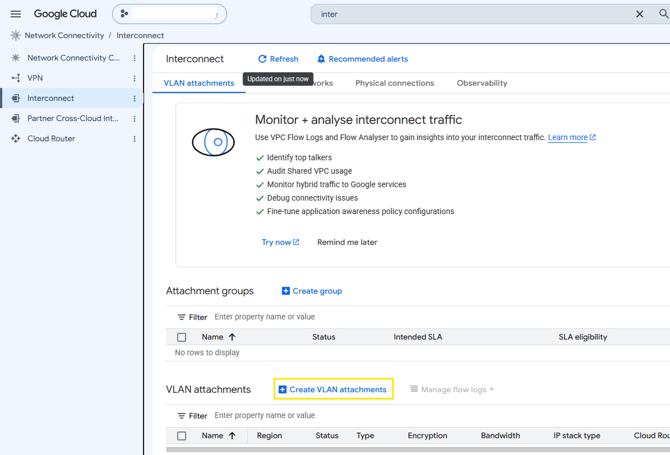
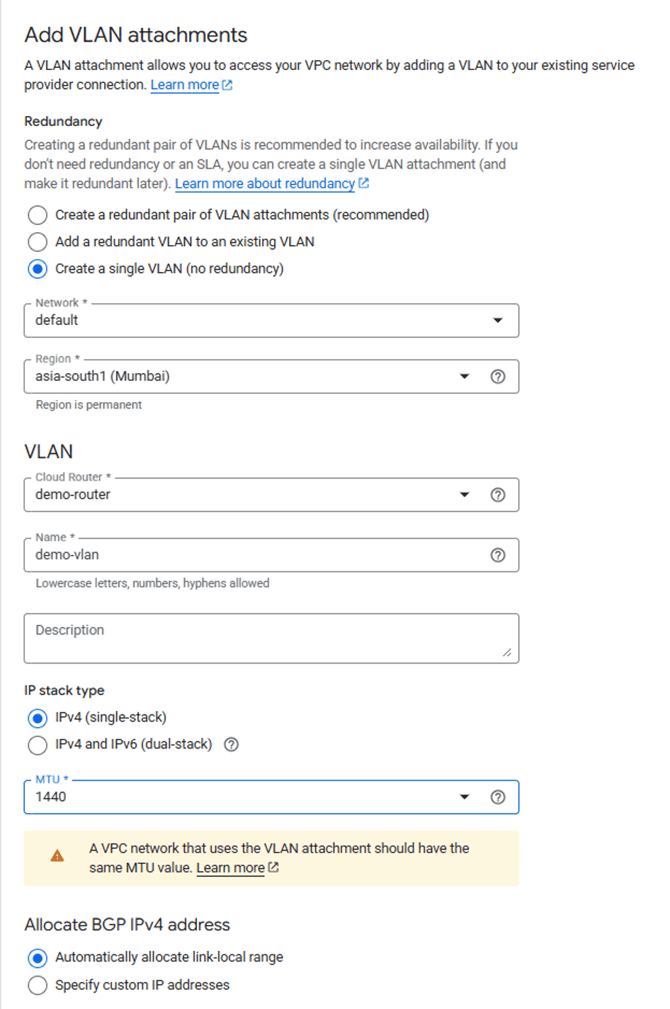
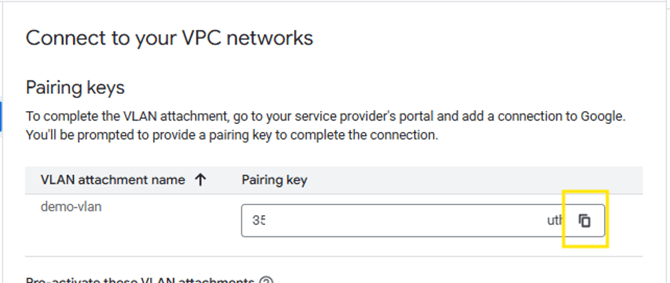
In your Google Cloud console, create the VLAN attachment for the partner exchange, with your region, IP stack and bandwidth. Google generates the pairing key.
-
Share the pairing key with Tata Communications via the TCx Portal.
-
Tata Communications provisions the circuit over the partner exchange and activates the key.
-
On Layer 3, Google assigns the addressing and Tata Communications brings up the BGP to Google – you reach GCP over the L3VPN. On Layer 2, you configure BGP on your CPE directly to Google.
The full walkthrough is covered in Provisioning and Configuration section.
Bandwidth changes on the partner-routed path
Bandwidth changes are made in place on the partner exchange: the virtual-circuit capacity is updated and BGP reconverges within minutes, and the Google VLAN attachment auto-scales to match – no manual change is needed on the Google side. Downgrades are supported with minimal impact. Note that upgrading an existing 20/50 Gbps connection is not supported (those are new provisioning only, in select metros).