
Virtual Interfaces are AWS-side constructs you create in your AWS console after accepting the Hosted Connection. Tata Communications provides the VLAN tag and BGP transit subnet; you choose the VIF type and the AWS-side routing association. This page is the home for the VIF-creation screenshots.
AWS Virtual Interfaces (VIFs) are the BGP peering sessions configured on a Hosted Connection. VIF creation and type selection happen in your AWS account; Tata Communications provides the parameters the VIF needs.
VIF types at a glance
-
Private VIF – connects to a VPC via a Virtual Private Gateway or Direct Connect Gateway. For VPC-hosted resources.
-
Public VIF – connects to AWS public services (S3, DynamoDB) over the dedicated path. Requires a public ASN and public IP space.
-
Transit VIF – connects to one or more Transit Gateways via a Direct Connect Gateway. For multi-VPC and multi-region architectures.
Tata Communications-side parameters per VIF
When you create a VIF, you’ll need these values from Tata Communications:
|
Parameter |
Value provided by Tata Communications |
|
VLAN tag |
Allocated by Tata Communications, unique per VIF |
|
BGP transit subnet (Private VIF) |
/30 private |
|
BGP transit subnet (Public VIF) |
/30 non-routable public |
|
Tata Communications-side ASN |
4755 (fixed) |
|
MD5 authentication key |
Mandatory, identical on both sides |
What you control on the AWS side
-
Selecting the VIF type per your architecture.
-
Setting the VIF BGP ASN to 4755 (the Tata Communications ASN shown in Get Network Config), AWS uses a region-dependent ASN on its side.
-
Configuring the VIF in the AWS console with the parameters above.
-
Private VIF - associating a Virtual Private Gateway or Direct Connect Gateway.
-
Public VIF - registering advertised prefixes in IRR for AWS validation.
-
Transit VIF - associating a Direct Connect Gateway and Transit Gateway.
-
Separate Private VIFs for production and staging VPCs.
-
One Private VIF for VPC access plus one Public VIF for S3.
-
One Transit VIF for multi-VPC access via Transit Gateway.
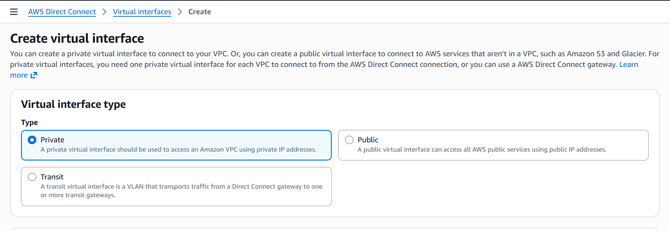
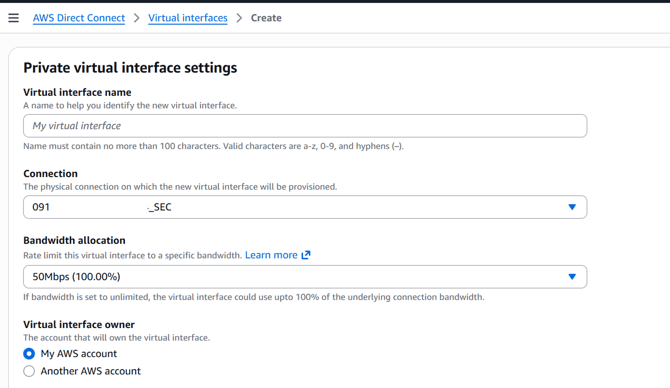
Refer to Provisioning of VIF on AWS for step-by-step details.
What’s on the cloud side
VIFs are created entirely in your AWS console using the parameters above. This page covers the Tata Communications-side parameter handoff; for the routing that runs over each VIF, see BGP Configuration for AWS.