


Introduction Kubernetes stands out as a pivotal solution that streamlines the deployment and orchestration of applications within containerised environments. The...
AWS MGN installation on windows workloads

Prerequisites
To install agents on machines with Windows OS, verify the following:
- (For replicating machines to AWS cloud only) - .NET Framework version 4.5 or above is installed on machines running Windows Server 2008 R2 or higher. .NET Framework version 3.5 or above on machines running Windows Server 2008 or lower.
- Windows source machines need to have at least 2 GB of free space to successfully launch a target machine.
How to get agent installation token
Log in to the AWS console and go to the respective region
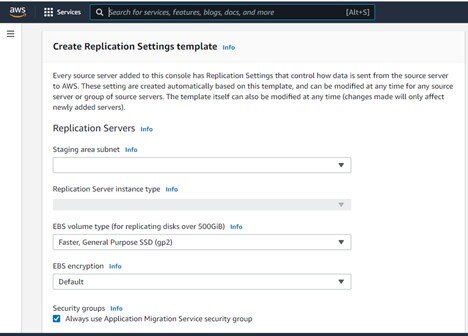
Create a replication template (Stage Subnet, Instance Type, Storage, VPN Routing)
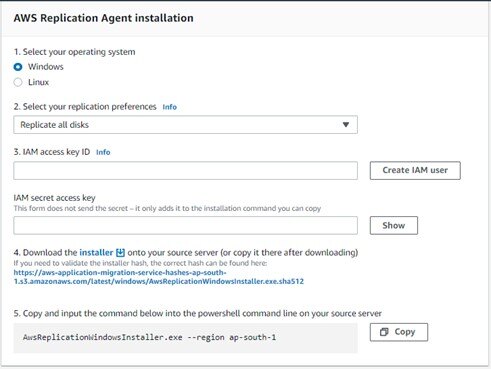
Pre-migration
This section describes the pre-migration activities for AWS MGN
Local admin user
The local admin user should have agent installation permissions on the server.
AWS MGN installation on Windows machines
The server administrator should follow the steps below to complete the MGN agent installation:
Note: MGN installation does not require a reboot
1) Download the MGN agent for Windows machines, which will be given by the Tata Communications team
2) Open the command prompt and go to the installer_win.exe path
3) Run the command given by the Tata Communications team to launch the installation file
AwsReplicationWindowsInstaller.exe --region ap-south-1 --aws-access-key-id XXXX --aws-secret-access-key XXXXX --no-prompt